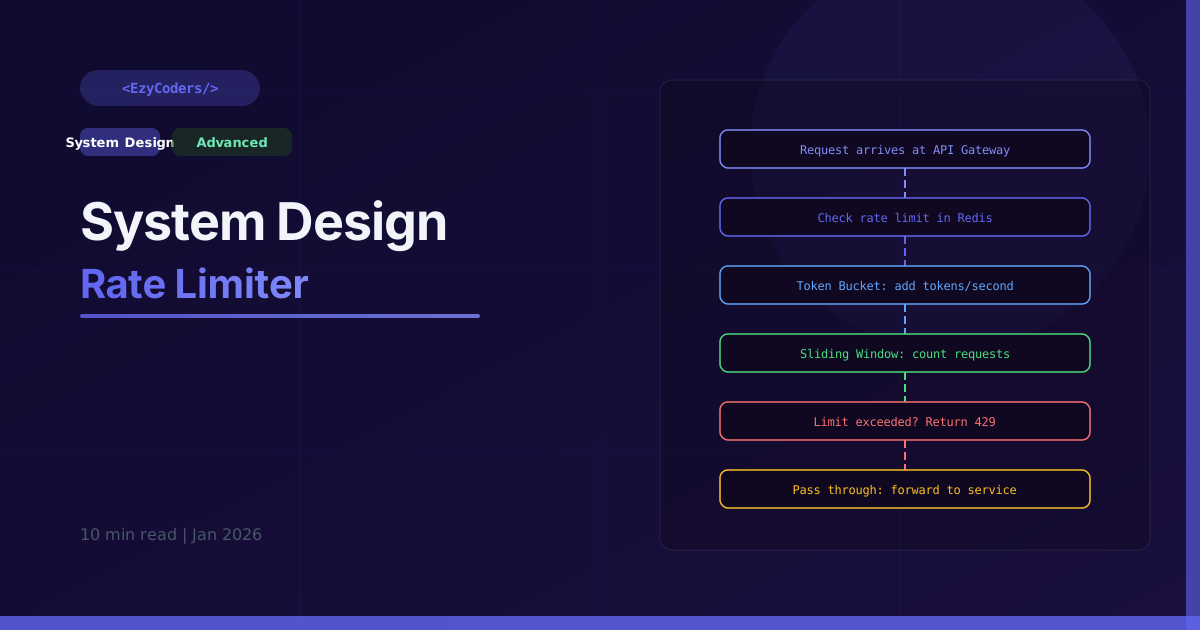
Rate Limiter Design
Rate limiting prevents API abuse, protects against DDoS attacks, and ensures fair usage. It is a critical component of any public API and appears frequently in system design interviews.
Rate Limiting Algorithms
import time
import redis

# 1. Token Bucket — smooth, allows short bursts
class TokenBucket:
    def __init__(self, capacity: int, refill_rate: float):
        self.capacity    = capacity    # max tokens (burst size)
        self.refill_rate = refill_rate # tokens added per second
        self.tokens      = capacity
        self.last_refill  = time.time()

    def allow(self) -> bool:
        now    = time.time()
        elapsed = now - self.last_refill
        # Add tokens based on elapsed time
        self.tokens     = min(self.capacity, self.tokens + elapsed * self.refill_rate)
        self.last_refill = now

        if self.tokens >= 1:
            self.tokens -= 1
            return True  # request allowed
        return False  # rate limited

# 2. Sliding Window Counter (Redis-backed — production ready)
class SlidingWindowRateLimiter:
    def __init__(self, redis_client, limit: int, window: int):
        self.redis  = redis_client
        self.limit  = limit   # max requests
        self.window = window  # window in seconds

    def is_allowed(self, user_id: str) -> bool:
        now = time.time()
        key = f"rate:{user_id}"

        pipe = self.redis.pipeline()
        # Remove timestamps outside the window
        pipe.zremrangebyscore(key, 0, now - self.window)
        # Count requests in window
        pipe.zcard(key)
        # Add current request
        pipe.zadd(key, {str(now): now})
        # Set expiry
        pipe.expire(key, self.window)
        _, count, *_ = pipe.execute()

        return count < self.limit

# Usage
limiter = SlidingWindowRateLimiter(redis.Redis(), limit=100, window=60)
if limiter.is_allowed('user_42'):
    process_request()
else:
    return {'error': 'Rate limit exceeded', 'retry_after': 60}, 429
Rate Limiter Middleware (FastAPI/Flask style)
from functools import wraps
from flask import request, jsonify, g
import redis

r = redis.Redis()

def rate_limit(limit=100, per=60, by='ip'):
    def decorator(func):
        @wraps(func)
        def wrapper(*args, **kwargs):
            # Identify the requester
            if by == 'ip':
                identifier = request.remote_addr
            elif by == 'user':
                identifier = request.headers.get('X-User-ID', request.remote_addr)
            elif by == 'api_key':
                identifier = request.headers.get('X-API-Key', 'anonymous')
            else:
                identifier = 'global'

            key    = f"rl:{func.__name__}:{identifier}"
            now    = time.time()
            window = now - per

            pipe = r.pipeline()
            pipe.zremrangebyscore(key, 0, window)
            pipe.zcard(key)
            pipe.zadd(key, {str(now): now})
            pipe.expire(key, per)
            _, count, *_ = pipe.execute()

            # Set rate limit headers (standard practice)
            remaining = max(0, limit - count - 1)
            response_headers = {
                'X-RateLimit-Limit':     limit,
                'X-RateLimit-Remaining': remaining,
                'X-RateLimit-Reset':     int(now + per),
            }

            if count >= limit:
                resp = jsonify({'error': 'Too Many Requests', 'retry_after': per})
                resp.status_code = 429
                for k, v in response_headers.items():
                    resp.headers[k] = v
                return resp

            result = func(*args, **kwargs)
            for k, v in response_headers.items():
                result.headers[k] = v
            return result
        return wrapper
    return decorator

@app.route('/api/search')
@rate_limit(limit=10, per=60, by='user')  # 10 searches per minute per user
def search():
    return jsonify({'results': []})
Distributed Rate Limiting Architecture
Client Request
    |
    v
API Gateway (Nginx / Kong / AWS API GW)
    |
    ├── Check rate limit in Redis Cluster
    |   Key: rl:{user_id}:{endpoint}
    |   Value: sorted set of timestamps
    |
    ├── ALLOWED → forward to backend service
    |
    └── BLOCKED → return 429 with Retry-After header

Redis Cluster setup:
- 3 master nodes + 3 replica nodes
- Consistent hashing: user_id → always same Redis node
- Lua scripts for atomic check-and-increment (no race conditions)
- Expiry automatically handles window cleanup
Q: Token Bucket vs Sliding Window — when to use each?
Token bucket allows bursting — a user can send 10 requests instantly then wait. Good for APIs where occasional bursts are acceptable. Sliding window is strictly smooth — no more than N requests in any rolling window. Better for preventing spike abuse. Sliding window requires more Redis memory (stores timestamps vs single counter).











Comments (0)
No comments yet. Be the first!
Leave a Comment