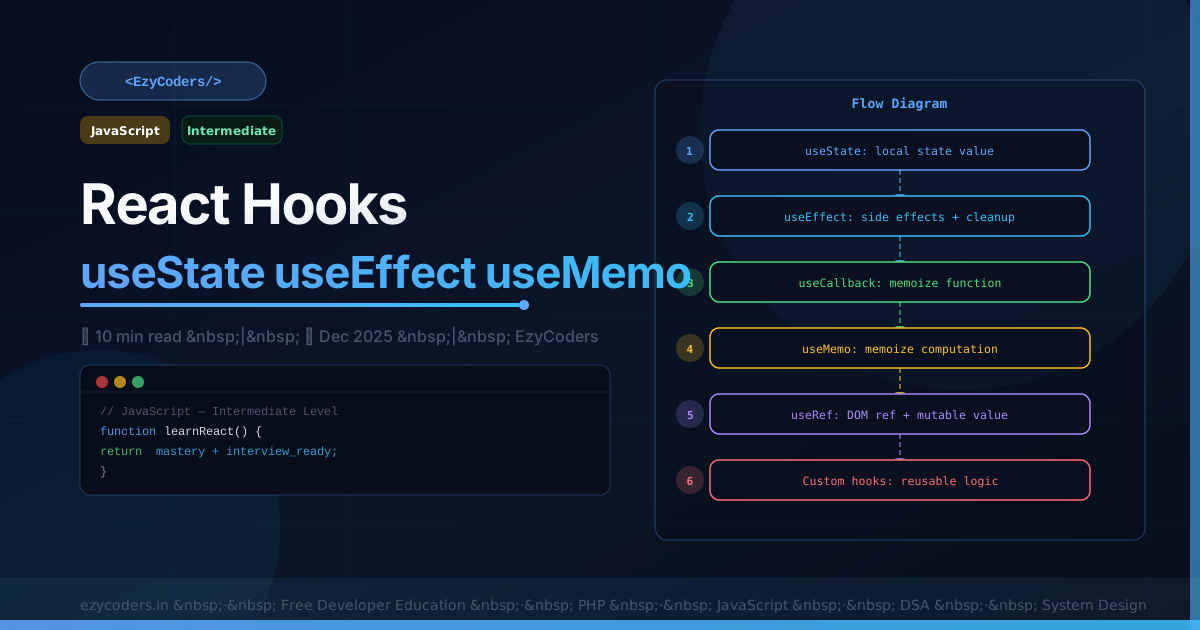
React Hooks
React Hooks replaced class components as the standard way to write React. Understanding when to use each hook — and when NOT to — is essential for any React developer interview.
import { useState, useEffect, useCallback, useMemo, useRef } from 'react';

// ── useState — local component state ─────────────────────────────
function Counter() {
    const [count, setCount] = useState(0);
    const [user,  setUser]  = useState(null);

    // Functional update (use when new state depends on old)
    const increment = () => setCount(prev => prev + 1);

    // Object state
    const updateName = (name) => setUser(prev => ({ ...prev, name }));
}
// ── useEffect — side effects ──────────────────────────────────────
function UserProfile({ userId }) {
const [user, setUser] = useState(null);
useEffect(() => {
// Runs after every render
});
useEffect(() => {
// Runs ONCE (on mount)
fetchUser(userId).then(setUser);
return () => {
// Cleanup on unmount (cancel subscriptions, timers)
subscription.unsubscribe();
};
}, []); // empty deps = run once
useEffect(() => {
// Runs when userId changes
setUser(null);
fetchUser(userId).then(setUser);
}, [userId]);
}// ── useCallback — memoize functions ──────────────────────────────
function Parent() {
const [count, setCount] = useState(0);
// Without useCallback: new function reference every render
// → Child re-renders even if count didn't affect it
const handleClick = useCallback(() => {
console.log('clicked');
}, []); // no deps = stable reference forever
return <Child onClick={handleClick} />;
}
// ── useMemo — memoize expensive computations ──────────────────────
function SortedList({ items, filter }) {
// Only re-computes when items or filter changes
const filtered = useMemo(() =>
items.filter(i => i.active).sort((a,b) => a.name.localeCompare(b.name)),
[items, filter]
);
return <ul>{filtered.map(i => <li key={i.id}>{i.name}</li>)}</ul>;
}
// ── useRef — DOM refs and mutable values ──────────────────────────
function Timer() {
const intervalRef = useRef(null); // mutable, no re-render on change
const inputRef = useRef(null); // DOM ref
const start = () => {
intervalRef.current = setInterval(() => console.log('tick'), 1000);
};
const stop = () => clearInterval(intervalRef.current);
const focus = () => inputRef.current.focus();
return <input ref={inputRef} />;
}Q: When should you use useCallback vs useMemo?
useCallback memoizes a function — returns the same function reference. Use when passing callbacks to child components wrapped in React.memo to prevent unnecessary re-renders. useMemo memoizes a computed value — use for expensive calculations. Rule: don't use either prematurely — the overhead of memoization can be worse than the re-render for simple cases.













Comments (0)
No comments yet. Be the first!
Leave a Comment