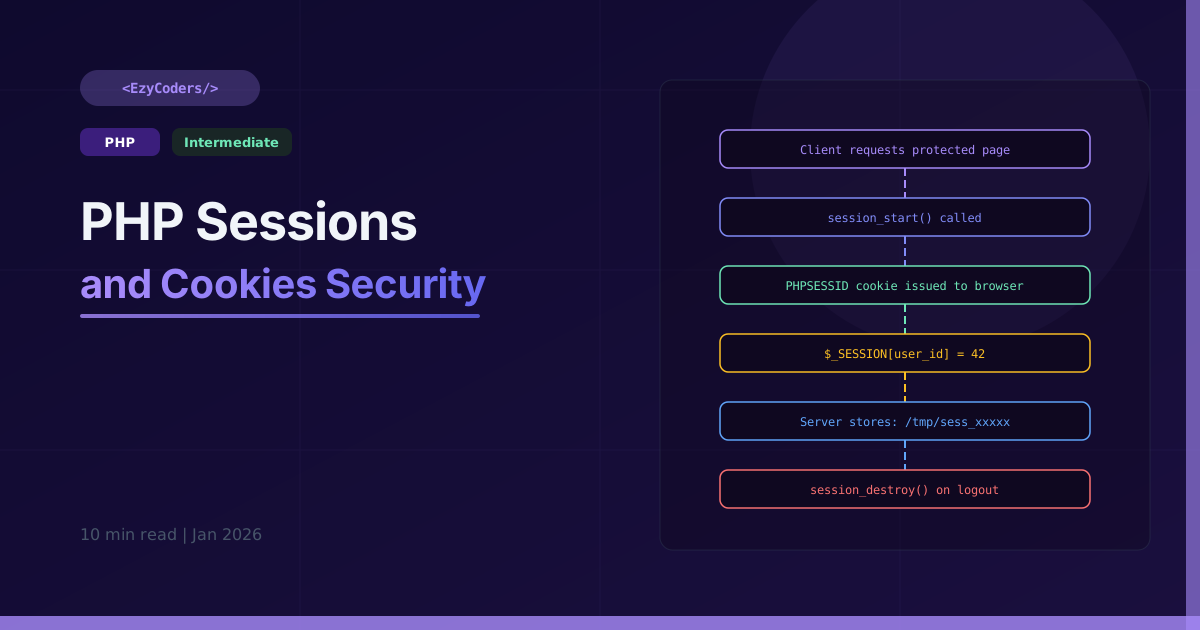
Sessions vs Cookies
Sessions store data on the server — only the session ID travels to the browser. Cookies store data in the browser itself. This fundamental difference drives every security decision in PHP authentication.
Starting and Using Sessions
<?php
session_start(); // Before ANY output

// Store data
$_SESSION['user_id']   = 42;
$_SESSION['username']  = 'rahul_dev';
$_SESSION['logged_in'] = true;

// Read (always use null coalescing for defaults)
$userId = $_SESSION['user_id'] ?? null;

// Secure session configuration
session_start([
    'cookie_lifetime' => 0,        // expire on browser close
    'cookie_httponly' => true,     // JS cannot read
    'cookie_secure'   => true,     // HTTPS only
    'use_strict_mode' => true,     // reject unknown IDs
    'cookie_samesite' => 'Strict', // prevent CSRF
]);

// Regenerate ID after login (prevents session fixation!)
function login(string $email, string $pass): bool {
    if (verifyCredentials($email, $pass)) {
        session_regenerate_id(true); // ← critical security step
        $_SESSION['user_id']    = getUserId($email);
        $_SESSION['login_time'] = time();
        $_SESSION['logged_in']  = true;
        return true;
    }
    return false;
}

// Secure logout
function logout(): void {
    session_start();
    $_SESSION = [];
    if (ini_get('session.use_cookies')) {
        $p = session_get_cookie_params();
        setcookie(session_name(), '', time()-42000,
            $p['path'], $p['domain'], $p['secure'], $p['httponly']);
    }
    session_destroy();
    header('Location: /login');
    exit;
}
Setting Cookies Securely
<?php
// PHP 7.3+ array syntax — recommended
setcookie('theme', 'dark', [
    'expires'  => time() + 30 * 24 * 3600, // 30 days
    'path'     => '/',
    'secure'   => true,     // HTTPS only
    'httponly' => true,     // no JS access
    'samesite' => 'Strict', // CSRF protection
]);

// Reading cookies — always sanitize!
$theme = $_COOKIE['theme'] ?? 'light';
$theme = filter_input(INPUT_COOKIE, 'theme', FILTER_SANITIZE_SPECIAL_CHARS);

// Delete a cookie (set expiry in past)
setcookie('theme', '', time() - 3600, '/');
Secure Remember Me
<?php
function setRememberMe(int $userId): void {
    $token  = bin2hex(random_bytes(32));      // 64-char secure random
    $hashed = hash('sha256', $token);         // store hash, not token

    $db->query(
        'INSERT INTO remember_tokens (user_id, token_hash, expires_at) VALUES (?,?,?)',
        [$userId, $hashed, date('Y-m-d H:i:s', time() + 30*24*3600)]
    );

    setcookie('remember_me', $userId.':'.$token, [
        'expires'  => time() + 30 * 24 * 3600,
        'path'     => '/',
        'secure'   => true,
        'httponly' => true,
        'samesite' => 'Strict',
    ]);
}

function checkRememberMe(): ?int {
    if (empty($_COOKIE['remember_me'])) return null;
    [$userId, $token] = explode(':', $_COOKIE['remember_me'], 2);
    $hashed = hash('sha256', $token);
    $row    = $db->query(
        'SELECT * FROM remember_tokens WHERE user_id=? AND token_hash=? AND expires_at>NOW()',
        [(int)$userId, $hashed]
    )->fetch();
    return $row ? (int)$userId : null;
}
Session Timeout
<?php
session_start();
$timeout = 30 * 60; // 30 minutes

if (isset($_SESSION['last_activity'])) {
    if (time() - $_SESSION['last_activity'] > $timeout) {
        session_destroy();
        header('Location: /login?reason=timeout');
        exit;
    }
}
$_SESSION['last_activity'] = time();
Q: Where are PHP session files stored?
In /tmp by default (session.save_path). On shared hosting this is a security risk. Use database-backed sessions or Redis in production: session_set_save_handler() or session.save_handler=redis.
Q: What is session fixation and how do you prevent it?
An attacker sets a known session ID before the victim logs in, then uses that ID after login to hijack the session. Prevention: always call session_regenerate_id(true) immediately after successful authentication.













Comments (0)
No comments yet. Be the first!
Leave a Comment