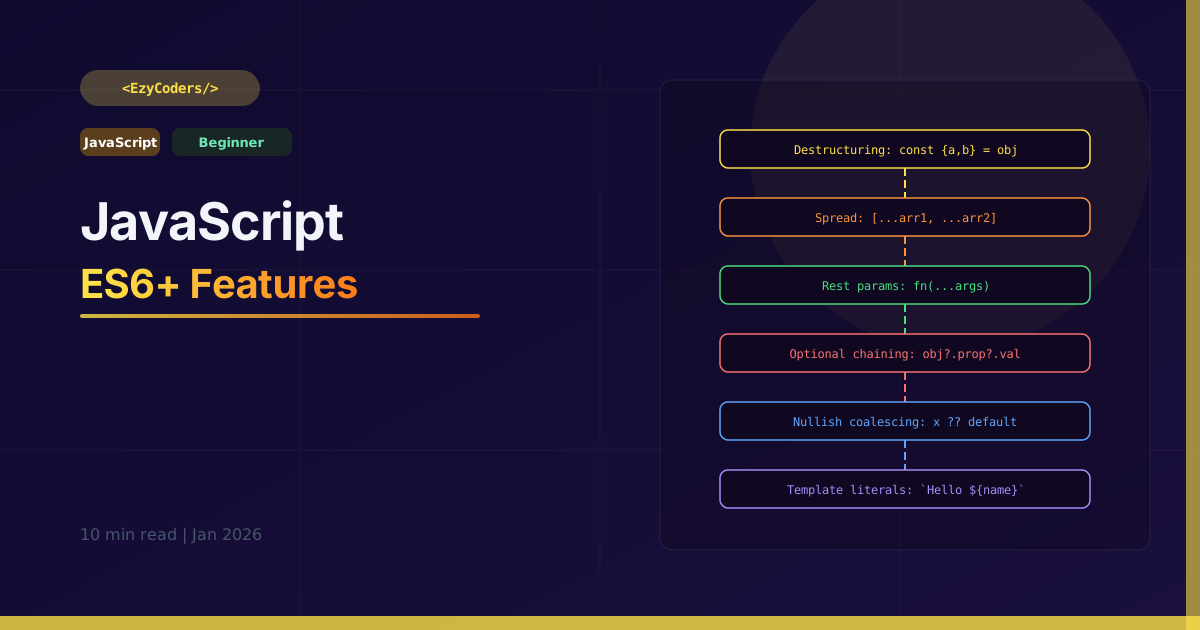
ES6+ Changed Everything
ES6 (2015) and subsequent versions transformed JavaScript from a scripting language into a powerful, modern programming platform. These features are tested in every frontend and full-stack JS interview.
Destructuring
// Array destructuring
const [first, second, ...rest] = [1, 2, 3, 4, 5];
console.log(first);  // 1
console.log(rest);   // [3, 4, 5]

// Skip elements
const [,, third] = [10, 20, 30]; // 30

// Object destructuring
const { name, age, city = 'Mumbai' } = { name:'Rahul', age:25 };
console.log(name); // Rahul
console.log(city); // Mumbai (default)

// Rename while destructuring
const { name: userName, age: userAge } = user;

// Nested destructuring
const { address: { street, pincode } } = { address: { street:'MG Road', pincode:'400001' } };

// Function parameter destructuring
function greet({ name, role = 'Member' }) {
    return `Hello ${name}, you are a ${role}`;
}
greet({ name: 'Rahul', role: 'Admin' });
Spread and Rest
// Spread — expand iterable
const arr1 = [1, 2, 3];
const arr2 = [4, 5, 6];
const merged = [...arr1, ...arr2]; // [1,2,3,4,5,6]

// Clone array (no mutation)
const copy = [...arr1];

// Spread object (shallow clone/merge)
const defaults  = { theme: 'dark', lang: 'en' };
const userPrefs = { lang: 'hi', fontSize: 16 };
const config    = { ...defaults, ...userPrefs };
// { theme:'dark', lang:'hi', fontSize:16 }

// Rest — collect remaining into array
function sum(first, ...rest) {
    return rest.reduce((acc, n) => acc + n, first);
}
sum(1, 2, 3, 4); // 10
Optional Chaining and Nullish Coalescing
const user = {
    name: 'Rahul',
    address: null,
    getProfile: () => ({ avatar: 'rahul.jpg' })
};

// Optional chaining (?.)
// Without it: user.address && user.address.city
const city = user.address?.city;          // undefined (no error!)
const zip  = user.address?.zipcode;       // undefined
const ava  = user.getProfile?.()?.avatar; // 'rahul.jpg'
const role = user.roles?.[0];            // undefined (array access)

// Nullish coalescing (??) — only triggers on null/undefined
const city2 = user.address?.city ?? 'Unknown'; // 'Unknown'
const count  = 0 ?? 'Default';  // 0 (falsy but NOT null/undefined)
const name2  = '' ?? 'Anon';    // '' (empty string is not null)

// vs OR operator — triggers on ALL falsy values
const count2 = 0 || 'Default'; // 'Default' (might not be what you want!)
Template Literals
const name  = 'Rahul';
const score = 95;

// Multi-line strings (no \n needed)
const html = `
  <div class="user">
    <h2>${name}</h2>
    <p>Score: ${score * 1.1}</p>
  </div>
`;

// Tagged template literals
function highlight(strings, ...values) {
    return strings.reduce((result, str, i) =>
        `${result}${str}${values[i] ? `<mark>${values[i]}</mark>` : ''}`, '');
}

const result = highlight`Hello ${name}, your score is ${score}!`;
// Hello Rahul, your score is 95!
Q: What is the difference between ?? and ||?
|| returns the right side if the left is ANY falsy value (0, '', false, null, undefined). ?? only returns the right side if the left is null or undefined. Use ?? when 0 or empty string are valid values you want to keep.











Comments (0)
No comments yet. Be the first!
Leave a Comment