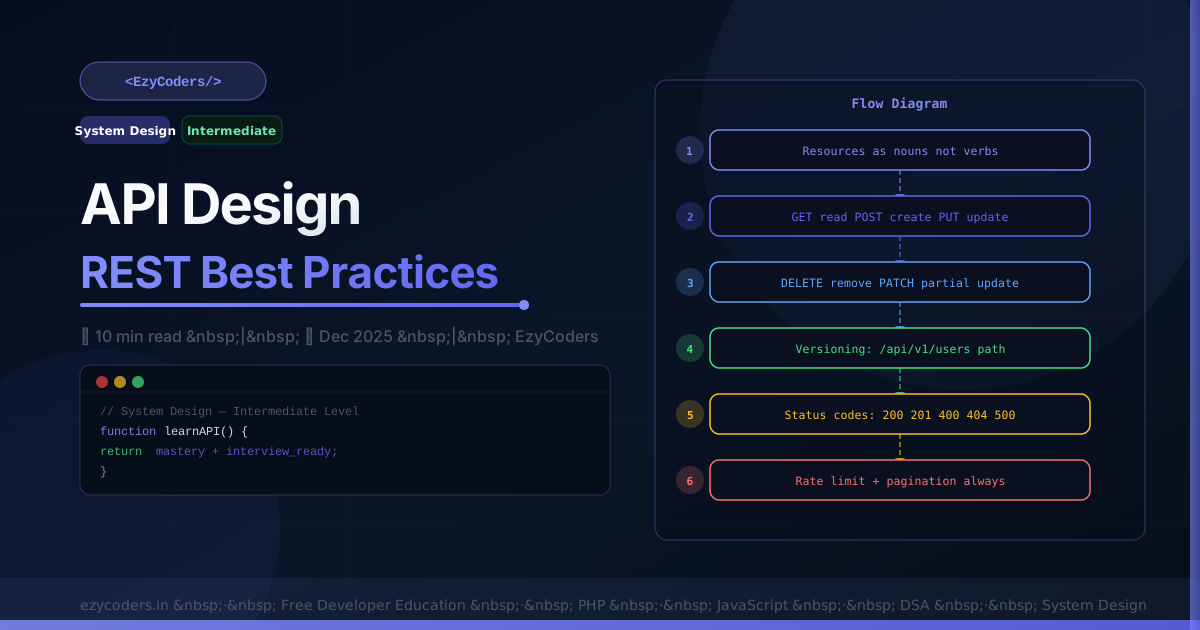
API Design Best Practices
A well-designed API is a product. Consistent, intuitive, versioned, and secure. Poor API design creates integration bugs that last for years.
RESTful URL Design
GOOD — Resources as nouns:
GET    /api/v1/posts           — list posts
POST   /api/v1/posts           — create post
GET    /api/v1/posts/42        — get post #42
PUT    /api/v1/posts/42        — replace post #42
PATCH  /api/v1/posts/42        — partial update
DELETE /api/v1/posts/42        — delete post
GET    /api/v1/posts/42/comments — nested resource

BAD — Verbs in URLs:
POST /api/createPost
GET  /api/getPostById?id=42
HTTP Status Codes
from flask import jsonify

def create_post():
    post = Post.create(request.json)
    return jsonify(post.to_dict()), 201  # 201 Created

def update_post(post_id):
    Post.update(post_id, request.json)
    return '', 204  # 204 No Content

def get_post(post_id):
    post = Post.find(post_id)
    if not post:
        return jsonify({'error': 'Post not found', 'code': 'NOT_FOUND'}), 404

def create_user():
    errors = validate(request.json)
    if errors:
        return jsonify({'error': 'Validation failed', 'details': errors}), 422

def protected():
    if not current_user:
        return jsonify({'error': 'Authentication required'}), 401
    if not current_user.can('edit_posts'):
        return jsonify({'error': 'Insufficient permissions'}), 403
Versioning and Pagination
@app.route('/api/v1/posts')
def list_posts():
    page     = int(request.args.get('page', 1))
    per_page = min(int(request.args.get('per_page', 20)), 100)
    offset   = (page - 1) * per_page
    posts    = Post.query.limit(per_page).offset(offset).all()
    total    = Post.query.count()

    return jsonify({
        'data': [p.to_dict() for p in posts],
        'pagination': {
            'page':        page,
            'per_page':    per_page,
            'total':       total,
            'total_pages': (total + per_page - 1) // per_page,
            'next': f'/api/v1/posts?page={page+1}' if offset+per_page < total else None,
        }
    })
Consistent Error Response
{
    "error": {
        "code":    "VALIDATION_FAILED",
        "message": "The request data is invalid",
        "details": {
            "email": "Must be a valid email address",
            "name":  "Must be between 2 and 50 characters"
        },
        "request_id": "req_abc123",
        "docs": "https://api.ezycoders.in/docs/errors#VALIDATION_FAILED"
    }
}
Q: What is the difference between PUT and PATCH?
PUT replaces the entire resource — you must send the complete object. PATCH partially updates — only send fields you want to change. In practice, most teams use PATCH for updates as it is more bandwidth-efficient and safer (no accidental field deletion).
Q: How do you handle API versioning?
Three approaches: URL versioning (/api/v1/), header versioning (Accept: application/vnd.api+json;version=1), and query param (?version=1). URL versioning is most popular — it is explicit, easily testable in a browser, and cacheable. Never break v1 after release — add v2 with changes.











Comments (0)
No comments yet. Be the first!
Leave a Comment